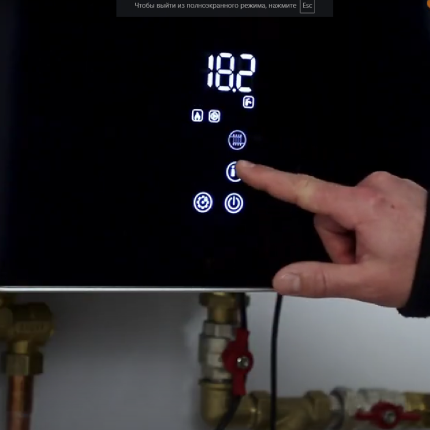
Service Menu Parameter Settings
The service menu allows you to configure the boiler’s operating modes, check its operating parameters, connect additional modules, or restore factory settings.
The boiler has 11 service parameters.
-
How to Enter the Service Menu
- Turn on the boiler by pressing the power icon (the icon’s backlight will change from red to white).
- Set the heating and hot water modes to “off” by pressing the corresponding icons. Icons’ backlight will change from bright (100%) to dim (50%).
- Press and hold the gear icon for 6 seconds.
- The service mode P1 will appear on the screen. You can scroll through the boiler’s service menu parameters from P1 to P11 using the arrows. To enter the selected parameter, press the “off” icon. Set the desired parameter value using the arrows. Pressing the “off” icon again will save the active parameter value and return you to the parameter selection mode.
-
Parameter P1: Forced Pump Activation
Used for boiler operation setup or bleeding the heating system
- Value 0: Pump off
- Value 1: Pump on
-
Parameter P2: Position of the Three-Way Valve
Used for boiler operation setup or bleeding the heating system
- Value 0: Valve off – Value 1: Valve in DHW mode
- Value 2: Valve in heating mode
Note: When the pump is on, the valve automatically switches to DHW mode.
-
Parameter P3: Heat Carrier Flow Rate Indication
Used for checking the heat carrier flow rate, flow sensor, and circulation pump
- Measures the heat carrier flow rate through the boiler in liters per minute (measurements are taken only when parameter P1 is on)
-
Parameter P4: Limiting the Boiler’s Maximum Power in Heating Mode
- Value 6: No limitations (all 6 heating elements are active), corresponds to the boiler’s maximum power
- Value 2-5: 2-5 of the 6 heating elements are active
- Value 1: Only 1 heating element is active (minimum value), corresponds to the boiler’s minimum power
-
Parameter P5: Limiting the Boiler’s Maximum Power in Hot Water Supply Mode (DHW)
- Similar to parameter P4, values range from 6 to 1.
-
Parameter P6: Limiting the Boiler’s Power with “Priority Consumer” Signal
- Sets the degree of power reduction for the boiler from 6 (no limitations) to 0 (complete limitation).
-
Parameter P7: Limiting the Maximum Temperature of the Heat Carrier in Heating Mode
- Choose a value from 30°C to 80°C to set the maximum temperature of the heat carrier at the boiler’s outlet in heating mode.
-
Parameter P8: Limiting the Maximum Temperature of Water in the Indirect Heating Water Heater
Choose a value from 30°C to 60°C to set the maximum temperature of the DHW.
-
Parameter P9: Limiting the Maximum Temperature of the Heat Carrier in Hot Water Supply Mode
- Choose a value from 30°C to 80°C to set the maximum temperature of the heat carrier at the boiler’s outlet in DHW mode. The correct temperature limit setting should be 20-25°C higher than the value of parameter P8. For example, if you set the hot water limit to 40°C in parameter P8, then parameter P9 should be limited to 60-65°C.
-
Parameter P10: Resetting the Boiler’s Service Menu Settings
Used for resetting the service menu parameters during boiler setup
- Value 0: Exit the service menu
- Value 1: Reset to factory settings and exit the service menu
-
Parameter P11: Resetting Wi-Fi Settings to Factory Settings
Used for resetting Wi-Fi parameters when connecting the boiler to the application
- Value 0: Exit the service menu
- Value 1: Reset Wi-Fi settings and exit the service menu
Note: When parameter P11 is reset, the settings of parameters P1-P10 are not reset.